Skip to content

Free open house sign-in sheet

One letter-size page with the seven columns you need to follow up. Print it free, or let visitors sign in on their own phones.

Letter size, one page. No email, no sign-up.

Sample entries. The PDF prints blank.Full-size version

Paper or the Welcome card?

Print the sheet, or let visitors tap the Welcome card and sign in on their own phones. Here is what each one is good at.

The paper sheet

Print it, put it by the door, type it up later.

CostFree PDF
Who writes itThe visitor, by hand
Readable namesDepends on the pen
Who sees the detailsEveryone who signs after
Into your MVB CRMYou type each one in
Follow-upYou set it
NeedsA pen that works

The Welcome card

Visitors tap it and sign in on their own phones.

CostSeparate kit; price to be confirmed
Who writes itThe visitor, on their own phone
Readable namesTyped by them
Who sees the detailsYou, in your MVB CRM
Into your MVB CRMLands there after sign-in
Follow-upManage in the app
NeedsTheir phone and a signal

What happens when a visitor taps

  1. Tap

    A visitor taps the card by the door. Your sign-in page opens in their phone's browser. They don't need the app.

  2. Sign in

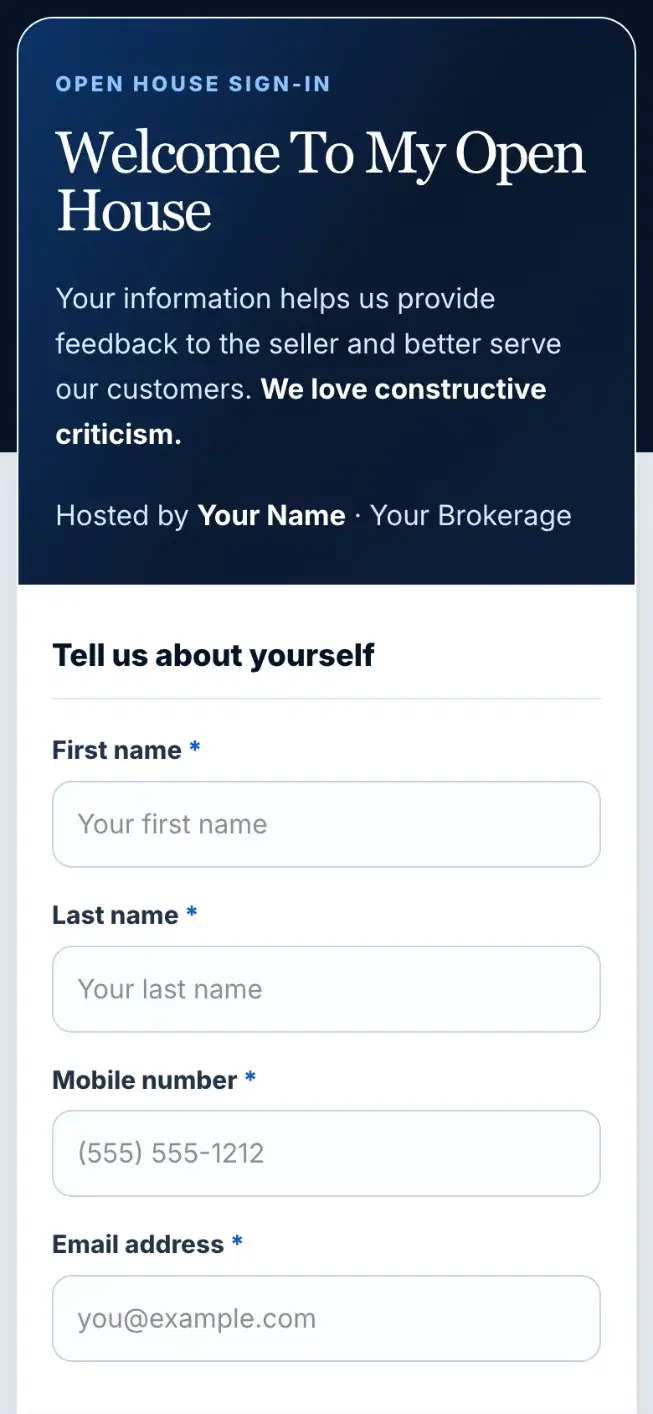
    Name, mobile number and email. Then optional questions: rent or own, timeline, the three ratings and “Was I helpful?”

  3. Follow up

    The contact lands in your MVB CRM and you get an email. A follow-up is scheduled, and their answers are saved as a note.

The Digital Lead Capture Kit includes a digital keychain, a premium metal digital registration card for open houses and a customized digital business card. It comes with the My Virtual Boss annual plan, which includes your Pro app subscription.

See what's in the Starter Kit
The open-house sign-in page a visitor sees after tapping the Welcome card
1:20 PM

She signs in on her phone.

1:215G
Crm
Search Contacts
Contacts4
Follow-ups
Maria Lopez
Follow up call
Today at 9:30 AM
Asked what she would walk away with
Darnell Price
Showing feedback
Today at 10:00 AM
Second look with his wife
Joyce Albright
Follow up call
Today at 11:30 AM
Thinking about spring
Ken Osei
Showing feedback
Today at 1:00 PM
Liked the kitchen, worried about the roof
Priya Shah
Follow up call
Today at 3:30 PM
Met at Saturday's open house
1:21 PM

Her follow-up, in your MVB CRM. Sample data.

What to put on an open house sign-in sheet

Seven columns, and each one has a job on Monday morning. If a field doesn't help you follow up, leave it off.

Name
First and last. A first name alone is hard to find again three weeks later.
Phone
Most follow-up starts with a call or a text, so ask for a mobile number.
Email
For the listing details, the disclosures and anything you promised to send.
Rent or own
An owner may have a home to sell first. That changes the conversation.
Timeline
Tells you who to call first. The digital sign-in offers six answers, from Immediately to Just exploring.
Working with an agent?
If they say yes, note the agent's name and follow up only with what you promised them.
Notes
One line while it's fresh: the room they liked, the question they asked, when they want to move.
Agent, property and date
At the top, so the sheet still makes sense in a pile of them.
A consent line
One sentence asking permission to contact them about the property and their real estate needs. The sheet and the digital sign-in both have it.

How to get visitors to actually sign in

Agents say it plainly: half the names on paper you can't read, and some of the rest are made up. Most of that is fixed at the door.

Put it where people stop

Just inside the door, on a table, at counter height. Two pens that work, and one on a string.

Ask first, before the tour

“Welcome. Please sign in here before you look around.” The rest of the door script is on the open house checklist.

Say what you'll do with it

“I'll send you the details on this one.” People write clearly when they know what's coming.

Cover the rows above

Everyone who signs after can read the earlier rows. Fold the sheet or slide a card over it.

Offer both

Some visitors would rather write. Some won't put a number where others can see it. Paper and the Welcome card side by side cover both.

Check it before they leave

Glance at the row while you walk them out. A missing digit is easy to fix at the door, impossible on Monday.

What to do with the names after

The sheet is only worth the calls you make from it. Here is the order to work it in.

  1. That evening

    Type every readable name into your MVB CRM. Put rent or own, timeline and your note in the contact's notes.

  2. The next morning

    Call or text the shortest timelines first. Mention one thing from your note so they remember you.

  3. Set a date for everyone else

    Give each contact a follow-up with a date, a time and a note. It shows up on your dashboard that day.

  4. By the next day

    Send the seller a summary. The feedback form gives you the ratings to put in it.

Paper names go into your MVB CRM by hand. Sign-ins from the Welcome card arrive there on their own, with a follow-up scheduled. If you already saved a visitor in your phone, import them from your phone contacts.

Keep their details private

Store the sheet somewhere private and don't leave it with the seller. Share ratings and comments with the seller, never names or numbers. Calling and texting rules still apply to people who gave you their number; ask your broker what your office requires.

7:405G
Crm
Search Contacts
Contacts4
Follow-ups
ML
Maria Lopez
NewSELLER
Call
DP
Darnell Price
ContactedBUYER
Call
JA
Joyce Albright
QualifiedSELLER
Call
KO
Ken Osei
ProposalBUYER
Call
Contacts

Everyone you met, in your MVB CRM. Sample data.

Put every name in your MVB CRM

Free to start. Each visitor gets a follow-up date, and the app asks "Did you follow up?" when it's due.

Download on the App Store

Questions agents ask

Is this open house sign-in sheet free?

Yes. Download the PDF or print it from this page. There is no email form and no sign-up. It is one letter-size page.

What should an open house sign-in sheet include?

Name, phone and email so you can follow up. Rent or own, timeline and whether they work with an agent so you know who to call first. A notes column, the property, the date and a line asking permission to contact them.

Can I edit the sheet or add my logo?

The PDF is a fixed sheet with blank lines for your name, the property and the date. It is not an editable Word or Canva file. Write your details at the top before you print copies.

Is a digital open house sign-in better than paper?

Each has a job. Paper works with no signal and suits visitors who would rather write. A digital sign-in gives you typed names, keeps each visitor's details private, and lets you collect contact information and property feedback.

Do visitors need an app to sign in with the Welcome card?

No. A visitor taps the card and your sign-in page opens in their phone's browser. You use the My Virtual Boss app. They do not.

What do I do with the sheet after the open house?

Type each readable name into your MVB CRM that evening, with their timeline in the notes. Set a follow-up for each one, starting with the shortest timeline. Then keep the sheet somewhere private.

More free open house printables

All open house tools

Open house feedback form

Three 1 to 10 ratings, “Was I helpful?” and a few lines for comments. The same questions as the Welcome card sign-in.

Get the free feedback form →

Open house checklist

Seventeen checks from the week before to the morning after, and a door script that fits on the same page.

Get the free checklist →